

Feeling overwhelmed by the thought of writing a business plan? You’re not alone. The old way means spending 40+ hours staring at a blank document and wrestling with complex spreadsheets. But the smart way involves using the right business plan software to get it done in minutes, not weeks.
Let’s be honest: financial projections are intimidating, and guessing what investors actually want to see is a recipe for stress. This ultimate guide is your shortcut. We cut through the noise to help you find the perfect tool for your startup, so you can transform your great idea into a professional, bank-ready document that gets you funded.
You’ll discover how to compare key features, build confident financial forecasts without being an accountant, and organize your vision into a plan you’re proud to present. Stop stressing and start building. Let’s find the software that gets your business launched, fast. ✓
Key Takeaways
- Stop wasting weeks on outdated templates. Learn how modern tools can produce a professional plan in a fraction of the time.
- Identify the must-have features, from financial projections to industry data, that separate powerful tools from basic ones.
- Compare the leading business plan software options to find the perfect solution for your specific startup needs and budget.
- Discover the simple steps to use an AI generator and create a complete, bank-ready plan in minutes, not weeks.
Why Use Business Plan Software? The Smart Way vs. The Old Way
Every entrepreneur knows a solid business plan is the roadmap to success. It’s the document that secures funding, guides your strategy, and turns a great idea into a real company. But let’s be honest-the process of creating one can be slow and painful. If you’re not even sure about the specifics of What is a business plan?, staring at a blank page can feel overwhelming from the start. The goal is a professional plan without the weeks of stress and guesswork.
The right business plan software provides structure, automation, and expert guidance you simply can’t get from a blank page. Let’s compare the old, frustrating method with the modern, efficient solution.
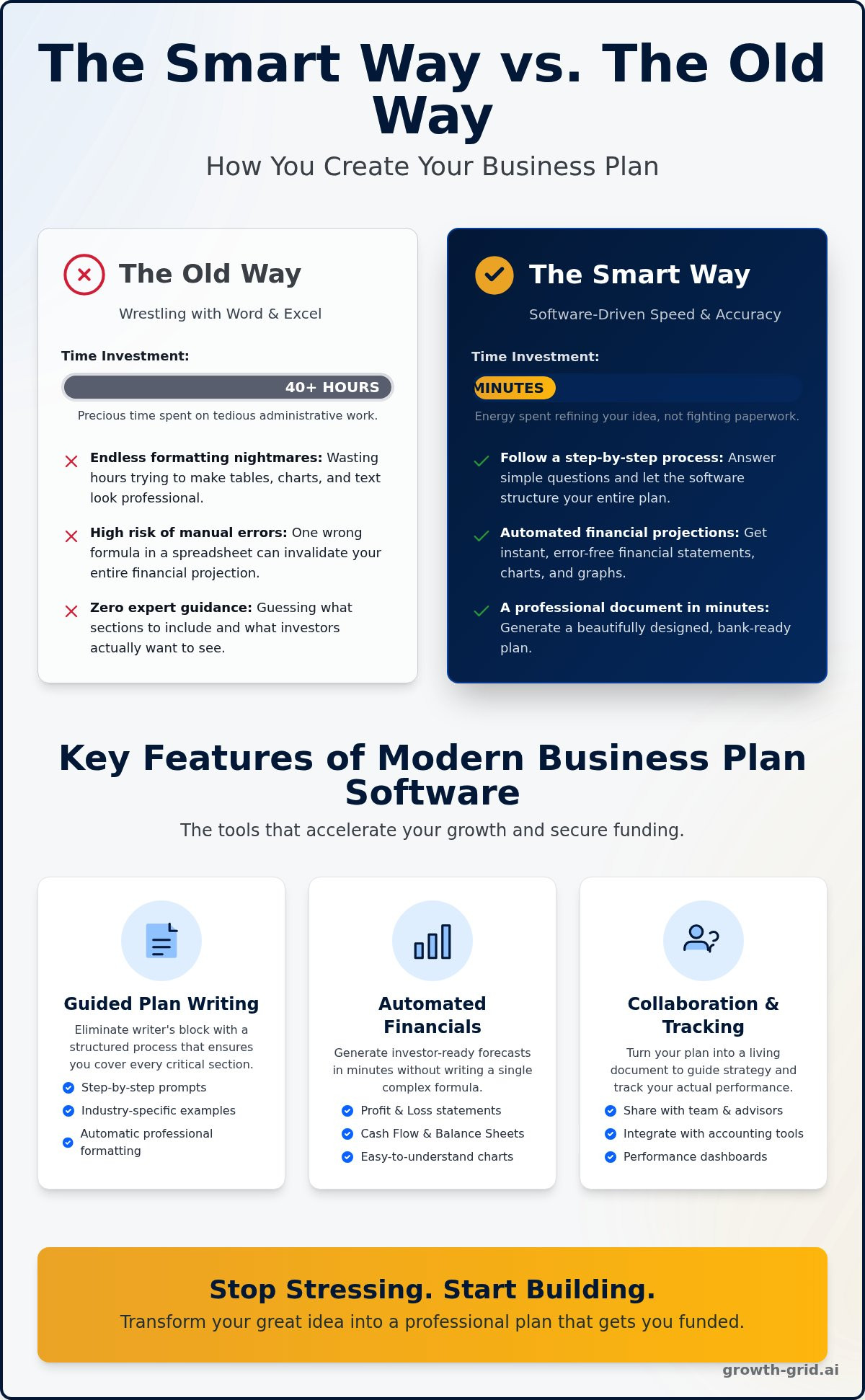
The Old Way: Wrestling with Word and Excel 😰
For decades, building a business plan meant a frustrating battle with generic documents and complex spreadsheets. You were on your own, trying to be a writer, a designer, and a financial analyst all at once. The common results?
- ✗ Endless formatting nightmares: Wasting hours trying to make tables, charts, and text look professional and consistent across 40+ pages.
- ✗ High risk of manual errors: One wrong formula in a complex financial spreadsheet can invalidate your entire projection, a mistake investors will spot instantly.
- ✗ Zero expert guidance: Guessing what sections to include, what lenders want to see, and how to phrase your mission statement.
- ✗ A 40+ hour time sink: Precious time spent on tedious administrative work instead of building your actual business.
The Smart Way: Software-Driven Speed and Accuracy ✨
Modern software flips the script entirely. Instead of struggling with blank documents, you’re guided through a smart, streamlined process designed for speed and accuracy. It’s about working smarter, not harder.
- ✓ Follow a step-by-step process: Answer simple questions and let the software structure your plan with expert-approved sections and prompts.
- ✓ Automated financial projections: Input your core numbers and get instant, error-free financial statements, charts, and graphs calculated for you.
- ✓ A professional document in minutes: Generate a beautifully designed, bank-ready plan that looks like it cost thousands to produce.
- ✓ Focus on what matters: Spend your energy refining your business idea, not fighting with paperwork and spreadsheets.
Key Features Every Great Business Plan Tool Must Have
Not all business plan software is created equal. Choosing the wrong tool can waste dozens of hours and leave you with a document that investors ignore. Knowing what features to look for saves you critical time and money, ensuring you get a powerful, professional result.
To help you decide, we’ve broken down the essential components into three key areas. Use this as your checklist when comparing options to find a tool that actually accelerates your growth.
Guided Plan Writing & Templates
The hardest part of writing a plan is often just starting. Great software removes the guesswork with a guided process that prompts you with the right questions. It helps you structure your thoughts logically, following the same core components recommended in the SBA guide to writing a business plan. Look for these critical writing features:
- Step-by-step prompts that eliminate writer’s block and ensure you cover all key sections.
- A library of industry-specific examples for inspiration and context.
- Automatic formatting for a professional, polished look every time.
- Easy export options to PDF and Word (DOCX) for seamless sharing.
Automated Financial Projections
Forget wrestling with complex spreadsheets. A top-tier tool handles the numbers for you, saving you weeks of stress and preventing costly errors. It should instantly generate the forecasts that banks and investors demand, with no need to be an Excel wizard. Key financial features include:
- Automatic generation of Profit & Loss, Cash Flow, and Balance Sheet statements.
- Easy-to-understand charts and graphs that visually represent your financial story.
- Investor-ready forecasts created without writing a single complex formula.
Collaboration and Performance Tracking
Your business plan is a roadmap, not a relic. The best business plan software turns your document into a living management tool that helps you track progress and make smarter decisions. This transforms your plan from a one-time project into an ongoing asset. Look for features that let you:
- Collaborate with team members or advisors in real-time.
- Integrate with accounting tools like QuickBooks to sync actual results.
- Use a performance dashboard to compare your financial projections to reality and stay on track.
Types of Business Plan Software: Which Is Right for You?
Gone are the days of staring at a blank Word template. The market for business plan software has evolved, offering powerful tools built for different needs. The best choice depends on your budget, timeline, and the core reasons for writing a business plan in the first place-whether it’s for securing a loan, aligning your team, or charting your own path.
Understanding the main categories is the fastest way to find your perfect fit. Let’s break down the three primary types of tools available today.
Traditional Step-by-Step Software (e.g., LivePlan)
This is the classic, guided approach. Think of it as a highly detailed, fill-in-the-blanks digital workbook. It methodically walks you through every section, ensuring you don’t miss a thing. While thorough, this process can still take several hours or even days to complete.
- Best For: Entrepreneurs who need deep, complex financial forecasting and want to track performance against their plan over time.
- Key Feature: Extremely detailed financial modeling and chart generation.
- Pricing Model: Typically a recurring monthly or annual subscription fee.
AI-Powered Generators (e.g., GrowthGrid)
This is the smart, modern solution for entrepreneurs who value speed and efficiency. These tools use powerful AI to generate a complete, professional first draft in minutes, not weeks. You provide the core details about your business, and the AI handles the heavy lifting of writing and formatting.
- Best For: Startups and small businesses needing a bank-ready, investor-grade plan without the stress and time commitment.
- Key Feature: Instantly generates entire sections of text, saving you 40+ hours of work.
- Pricing Model: Extremely affordable, often with a simple, one-time fee.
Project Management Hybrids (e.g., Smartsheet)
This category of tools isn’t designed for creating a formal, external business plan document. Instead, it focuses on turning your strategy into an actionable internal roadmap. These platforms are excellent for setting goals, assigning tasks, and keeping your team aligned on key objectives.
- Best For: Established businesses focused on internal strategic planning and execution.
- Key Feature: Emphasis on tasks, timelines, collaboration, and goal tracking.
- Pricing Model: Often part of a larger, more expensive project management suite.
Top Business Plan Software Options Compared
You know what to look for-now let’s compare the top contenders for the best business plan software. We’ll evaluate each option based on three core factors: speed, features, and price. This head-to-head comparison cuts through the noise and simplifies your decision, starting with a quick-reference table to see how they stack up.
Feature & Price Comparison Table
GrowthGrid: Best for Speed and Affordability
GrowthGrid is built for one thing: efficiency. Its powerful AI generates a complete, 72-section business plan in under 15 minutes, doing all the heavy lifting of writing for you. This makes it the perfect choice for entrepreneurs who need a professional, investor-ready plan without the weeks of work. The simple, low-cost, one-time payment model is ideal for startups managing a tight budget. Generate your plan in minutes, not weeks.
Dedicated Financial Management Software: Best for Ongoing Tracking
Beyond basic plan creation, some dedicated software solutions excel in detailed, ongoing financial management. These platforms often feature robust forecasting tools and dynamic performance dashboards, frequently offering integration with popular accounting software. They provide comprehensive capabilities, including extensive libraries of sample plans for inspiration. However, this level of depth and continuous support typically comes at a higher cost, structured as a recurring monthly subscription. Such tools are best suited for businesses requiring continuous financial tracking and in-depth analysis well beyond the initial planning phase.
Word/Google Docs Templates: The Free Option
The biggest appeal of a Word or Google Docs template is obvious: it’s free. While this saves money upfront, it costs you significant time and effort. You are responsible for 100% of the writing, financial calculations, and formatting. Without expert guidance or automation, it’s easy to make critical mistakes. This is a high-risk option if you’re creating a plan to secure funding from lenders or investors who expect a professional, error-free document.
How to Create Your Plan in Minutes With an AI Generator
Staring at a blank page is the hardest part of writing a business plan. The old way involved weeks of stress, research, and writer’s block. The smart way? Using an AI generator to create a complete, professional plan in minutes. The best business plan software today makes this process incredibly simple and intuitive for any entrepreneur, regardless of their writing experience.
It all boils down to three quick and easy steps. Go from a simple idea to a lender-ready document faster than you ever thought possible.
Step 1: Answer Simple Questions About Your Business
Forget complex business jargon. The process starts with the AI prompting you with a series of straightforward questions. You’ll describe your company’s mission, your products or services, your target market, and your main competitors. You just need to explain your vision in plain English. This initial information-gathering step is designed to be fast and easy, often taking only a few minutes to complete.
Step 2: Let the AI Write, Format, and Analyze
This is where you save dozens of hours of work. Once you’ve answered the initial questions, you simply click “Generate.” The AI instantly writes all the text for every section of your plan, from the executive summary to the marketing strategy. It also automatically creates your essential financial projection tables-like cash flow statements and profit and loss-and formats the entire document for a professional, polished look.
Step 3: Review, Edit, and Download Your Plan
In minutes, your complete business plan is ready for your review. While the AI does the heavy lifting, you always have the final say. You can easily click into any section to tweak the wording, add specific details, or adjust the tone to perfectly match your voice. Once you’re 100% satisfied, you can download the final document as a PDF or Word file, ready to share with investors, banks, or partners.
Ready to start? Generate Your Business Plan Now.
Stop Researching, Start Building: The Smart Way Forward
Navigating the world of business planning has fundamentally changed. As we’ve explored, the old way of painstakingly writing a plan from scratch is slow, costly, and unnecessarily stressful. The key takeaway is simple: modern tools are built for speed and results. The right business plan software doesn’t just fill in blanks; it provides a strategic, AI-powered framework that gives you a professional, investor-ready document in a fraction of the time. It’s the ultimate competitive advantage for a modern entrepreneur.
Why wait? You can stop staring at a blank page and start executing your vision today. Join thousands of entrepreneurs who have already made the smart switch. Instantly generate a comprehensive 40+ page, 72-section plan that gives you the clarity and confidence to succeed. Backed by our 100% Satisfaction Guarantee, you have everything to gain.
Stop stressing and start planning. Generate your business plan with AI in 8 minutes!
Frequently Asked Questions About Business Plan Software
How much does business plan software typically cost?
The cost varies, but you can expect to pay a one-time fee between $20 to $150 or a monthly subscription from $15 to $50. While not free, this is a tiny fraction of the $1,000+ you might pay a consultant. The smart investment in affordable software saves you hundreds of dollars and weeks of stress, delivering a professional, bank-ready plan without the massive expense. It’s the efficient way to get funding-ready, fast.
Is there any good free business plan software?
While some free tools and government templates exist, they often lack the critical features needed for a truly professional plan. You’ll miss out on guided instructions, automated financial projections, and industry-specific examples. Free options can be a starting point, but for a plan that will impress investors, a low-cost paid tool is a much more reliable and efficient investment. It ensures you don’t leave critical information out and get the results you need.
Can an AI generator write a plan that’s good enough for investors or a bank loan?
Yes, but think of it as a powerful co-pilot, not a replacement for you. An advanced AI can instantly generate a comprehensive, well-structured, and professionally written draft in minutes. This saves you 90% of the work. Your job is to then review, edit, and add your unique insights and specific financial data. The combination of AI efficiency and your expertise creates a polished, convincing plan that is absolutely ready for investors and banks.
Is my business idea safe and confidential when using an online tool?
Your security is critical, and reputable online tools take it seriously. Always choose a provider that uses bank-level encryption (like AES-256) to protect your data. Check their privacy policy to ensure they will never share or sell your information. Professional services understand that your business idea is your most valuable asset and are built from the ground up to ensure it remains confidential, giving you total peace of mind.
How long does it really take to write a business plan with software?
Writing a business plan the traditional way can easily take 40-60 hours. Modern business plan software completely changes the game. You can generate a complete, 40+ page first draft in under 15 minutes. From there, most entrepreneurs spend just a few hours personalizing the details and finalizing the financials. Instead of weeks of frustrating work, you can have a finished, professional plan ready in a single afternoon. It’s about working smarter, not harder.
What’s the difference between business plan software and a template?
A template is just a static document-a blank form you have to fill out all on your own. It offers structure but no real help. In contrast, business plan software is an interactive system. It guides you step-by-step, asks the right questions, provides examples, automates complex financial projections, and formats everything perfectly. A template is the old, slow way; software is the smart, fast way to get a professional result.