

Why are you still spending 40+ hours manually drafting a document that AI can now generate in under 15 minutes? It’s a frustrating reality for many entrepreneurs. With Mac shipments growing 9.1% in early 2026, you shouldn’t have to settle for clunky tools that require complex Excel formulas and outdated templates. Finding the top business plan software for mac is the only way to ensure your projections are professional and your documents actually impress investors.
We agree that the old way of planning is broken. You shouldn’t have to choose between professional quality and your own sanity. We promise to show you how to turn your vision into a polished document ✨ instantly. You’ll discover how to automate your financial projections and use AI assistants to handle the heavy lifting of writing without any spreadsheet errors.
We’ll break down the 7 best platforms available in May 2026, comparing verified pricing for tools like LivePlan and Upmetrics. You’ll see exactly which software offers the fastest path to a finished plan. Secure your funding and get back to building your business immediately.
Key Takeaways
- Stop wasting 40+ hours on manual templates and learn how modern software acts as an automated engine to build your strategy instantly.
- Compare the top business plan software for mac to find the perfect balance between AI speed and professional depth for your 2026 goals.
- Discover how to generate bank-ready financial projections without touching a single Excel formula or worrying about broken spreadsheet links.
- Master the simple two-step process to move from a raw idea to a professional 40+ page document in just 8–15 minutes ✨.
- See why choosing an AI-native platform like GrowthGrid saves you 90% on costs while delivering investor-grade quality for just $19.
Table of Contents
Why Traditional Business Planning Feels Outdated on a Mac
Your MacBook Pro or Air is a masterpiece of design and speed. Why are you still using it to fill out static, clunky word documents? In 2026, creating a formal written document to secure funding shouldn’t be a manual chore. The top business plan software for mac has evolved from a digital notebook into a high-performance automated engine. This shift is essential because Mac shipments grew 9.1% in the first quarter of 2026 alone. Entrepreneurs are choosing Apple for its efficiency, yet legacy planning tools still feel stuck in the early 2000s. Filling out a 40 page template manually in today’s fast-paced market is a waste of your talent and time.
Modern Mac users expect a clean UI and instant results. When you open a planning tool, you want it to feel as intuitive as macOS Sequoia. Legacy software often forces you into "The Old Way": wrestling with broken spreadsheet links and uninspired text boxes. The "Smart Way" treats your business plan as a living dashboard. It leverages AI to handle the heavy lifting while you focus on the vision. This evolution from local installs to high-performance, AI-driven cloud platforms ensures your strategy is as sophisticated as the hardware you use to build it.
The 40-Hour Trap: Where Does the Time Go?
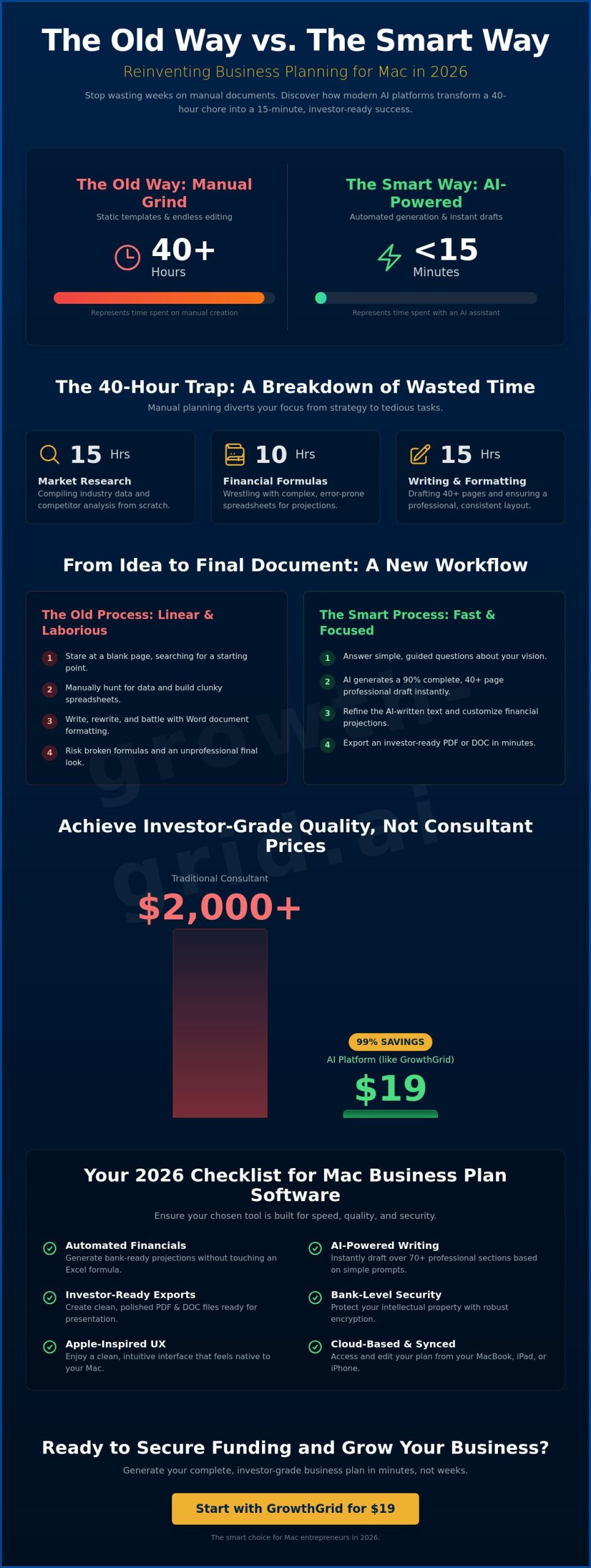
Where does your time actually go? Most founders spend 15 hours on market research, 10 hours wrestling with complex financial formulas, and another 15 hours on structural editing. That’s 40+ hours of talent wasted on formatting. The Smart Way flips this script entirely. By using the top business plan software for mac, you start with a draft that is already 90% finished. You get instant psychological relief because you aren’t staring at a blank page. Instead of drafting from scratch, you simply refine a professional strategy generated in under 8 minutes.
Native Apps vs. Browser-Based Powerhouses
Forget about heavy, local software installs that clutter your Applications folder and slow down your system. Modern entrepreneurs prefer Safari-optimized web apps that leverage the power of the cloud. These browser-based tools offer seamless cross-device syncing between your MacBook, iPad, and iPhone. While a static Mac app is limited by its local code, cloud-based models like GPT-4 provide real-time intelligence and dynamic updates. You get a design-forward experience that matches the Apple aesthetic without the lag or compatibility issues of legacy software.
What to Look for in Mac-Compatible Planning Software
Choosing the right platform means moving beyond a basic business plan template. You need a solution that eliminates the friction of manual data entry. The top business plan software for mac must offer automated financial projections. This means no more broken Excel formulas or manual links that crash your spreadsheet. Your software should also feature AI-powered section writing. It should generate 70+ professional sections instantly based on simple prompts about your vision. This ensures your document is comprehensive and bank-ready without you needing to spend weeks researching industry benchmarks.
Professionalism is non-negotiable for 2026 investors. Look for tools that provide investor-ready export options in clean PDF and DOC formats. These documents must look sharp on any device, from a high-resolution Studio Display to a mobile phone. Security is equally vital. Ensure the platform uses bank-level encryption to protect your intellectual property. Your business idea is your most valuable asset. It deserves a secure vault, not just a shared digital folder.
Speed and Efficiency Metrics
Time is your most scarce resource as a founder. The best platforms promise a finished draft in under 15 minutes. This speed is achieved through a smart question-and-answer interface. Why stare at a blank page when you can just answer guided prompts? Quantifying the value is simple. A professional business plan consultant typically charges $2,000 for a single document. Getting the same investor-grade quality for $19 is a massive win for your startup’s runway. It allows you to pivot and iterate without draining your bank account.
Design and User Experience (UX)
A clean, Apple-inspired interface does more than just look good. It actively reduces entrepreneurial stress. A "Smart UX" guides you through complex market analysis and competitive landscapes without making you feel overwhelmed. This is why modern founders are switching to AI business plan software to streamline their entire workflow. If you want to stop stressing and start building your future, you can generate your professional plan today. The top business plan software for mac should empower you, not frustrate you.
The Best Business Plan Software for Mac: 2026 Roundup
Most listicles recommend generic task managers that don’t actually write a single word of your strategy. A business plan is a strategic tool for entrepreneurs that requires specific, industry-standard language to be effective. When you choose the top business plan software for mac, you are investing in a dedicated logic engine. It should take your raw data and transform it into a narrative that compels investors to act immediately. The goal is to move away from fragmented drafting and toward a unified, professional output.
GrowthGrid: The 15-Minute Revolution
GrowthGrid is the 2026 standout for speed and AI precision. It leverages a custom GPT-4 model to build 72 professional sections in record time. You don’t have to worry about formatting or structural gaps. Simply answer a few guided questions and your 40+ page document is ready for export. At a $19 price point, it removes the financial barrier to professional planning. Explore our ultimate guide to business plan software for a deeper look at how these features streamline your launch.
Professional Alternatives for Specific Needs
Other verified platforms offer different strengths for Mac users in 2026. When comparing the top business plan software for mac, consider your specific workflow. Upmetrics is a robust choice for those needing its $49 per month Professional plan for detailed team collaboration. If you prefer a step-by-step building process for long-term tracking, IdeaBuddy’s Founder plan is available for $20 per month. Be aware that Enloop is currently undergoing a service upgrade in May 2026 and is not accepting new sign-ups. Selecting the "Smart Way" means choosing a platform that prioritizes speed over manual data entry.
How to Generate a Professional Plan in Under 15 Minutes
Stop staring at a blinking cursor. The traditional method of filling out templates is officially dead. While legacy apps on the App Store often show screenshots of manual editors, the smart way is to use an automated engine. In 2026, the top business plan software for mac doesn’t just give you a template; it writes the strategy for you. You don’t need to be a writer or a financial analyst to get investor-grade results. You just need to follow a simple, guided path that respects your time and your intelligence.
The process is designed for maximum speed. You can move from a raw concept to a 40+ page document by following these five steps:
-
Step 1: Input your core business idea and target audience. Be specific about the problem you solve.
-
Step 2: Answer the AI-guided questionnaire. This defines your unique strategy without the need for complex business jargon.
-
Step 3: Review the 72 automatically generated sections. The system handles everything from your SWOT analysis to detailed Market Analysis.
-
Step 4: Customise your financial projections with a few clicks. The software handles the math, so you don’t have to worry about broken spreadsheet cells.
-
Step 5: Export your professional PDF. You are now ready to start pitching to banks or venture capitalists.
Mastering the AI Input
To get a bank-ready result, you need to provide the AI with clear context. Don’t just say "I want to open a coffee shop." Instead, describe your unique location and your specific roasting process. You can use our startup business plan guide to refine your vision before you hit the generate button. AI turns a single prompt into a comprehensive 40-page document by mapping your inputs against thousands of successful industry models instantly.
Reviewing Your Financials with Confidence
Accuracy is everything when you are asking for money. You should always check the cash flow analysis generated by the tool to ensure it matches your local operational costs. Ensure your projections align with the 11.58% CAGR growth projected for the business software market through 2031. Take a moment to spot and fix common AI hallucinations in niche market data, such as specific local permit costs. This final polish ensures your plan is bulletproof.
Ready to stop drafting and start leading? Generate your professional plan ✨ and secure your funding in record time.
Why GrowthGrid is the Smart Choice for Mac Entrepreneurs
Efficiency defines the modern founder. You don’t have weeks to waste on manual drafting. GrowthGrid stands out as the top business plan software for mac because it respects your time. While legacy tools force you into a 40-hour writing marathon, our AI-native engine takes you from zero to ready to fund in just 8–15 minutes. It’s the ultimate hack for entrepreneurs who want to move fast. You get professional, investor-grade quality for just $19. This saves you 90% on costs compared to hiring traditional business plan writers or expensive consultants.
Completeness matters as much as speed. Your document needs to be comprehensive to win over banks and VCs. GrowthGrid generates 72 detailed sections that cover every critical aspect of your venture. This includes everything from legal structures and HR requirements to sophisticated marketing strategies. You aren’t just getting a summary; you’re receiving a full-scale operational roadmap. We remove the risk entirely with our "Love Your Plan or Your Money Back" guarantee. If you don’t feel empowered by your new plan, you don’t pay. It is that simple.
Beyond the Plan: Essential Business Documents
Success requires more than just an initial strategy. GrowthGrid supports your journey long after the initial launch phase. Our platform includes AI-powered Legal and HR document generators to help you manage ongoing operations. You can generate employment contracts, non-disclosure agreements, and company policies instantly. Having a single hub for all your professional paperwork reduces administrative stress. It allows you to stay focused on growth rather than getting bogged down in "The Old Way" of manual filing and fragmented folders.
The Verdict for Mac Users
Mac users demand high performance and clean design. GrowthGrid’s efficiency beats legacy software every single time. Why settle for clunky, outdated interfaces when you can use a tool built for the speed of 2026? Stop stressing about blank pages and complex formulas. Start building your future today by leveraging the power of AI. Your vision deserves a professional document that matches your ambition. It’s time to choose the smart way to plan. Generate your personalised business plan ✨ and secure the funding your business needs to thrive.
Secure Your Funding and Launch Your Vision Today
You’ve seen why manual drafting is a relic of the past. In 2026, your talent is too valuable to waste on broken spreadsheets and outdated templates. By choosing the top business plan software for mac, you move from a raw idea to a professional document ✨ instantly. You now have the roadmap to leverage AI for 72 professional sections while keeping your data safe with bank-level encryption. This is the smart way to build a future-forward business without the traditional stress.
Why spend 40+ hours stressing when you can have a bank-ready plan finished in under 15 minutes? It’s time to stop planning and start building. Your vision deserves an investor-grade strategy that reflects your ambition. We offer a 100% Satisfaction Guarantee because we’re confident you’ll love your professional results. Empower your startup today with the efficiency of modern technology and get back to what you do best. Your journey to a successful launch starts right now.
Start Saving Time Now – Save Weeks of Work →
Frequently Asked Questions
Is there a native business plan app for macOS?
While native apps exist on the Mac App Store, most are limited to manual entry and basic text editing. Modern entrepreneurs favor Safari-optimized cloud platforms because they offer superior AI integration and processing power. These tools provide a seamless experience that matches the Apple ecosystem’s speed without requiring a heavy local installation. You get the benefit of instant syncing across your MacBook, iPad, and iPhone.
Can I write a business plan on a Mac using AI?
You can definitely use AI to generate a professional business plan on your Mac. Modern platforms use sophisticated GPT-4 models to transform your basic concept into a 40+ page document instantly. This process handles the heavy lifting of market research and structural editing. It allows you to focus on high-level strategy rather than wrestling with a blank page for weeks.
What is the best free business plan software for Mac?
Most free options are limited to static templates that require 40+ hours of manual drafting. While Apple Pages provides basic business layouts, it doesn’t offer automated financial forecasting or AI-driven content generation. Investing in a professional platform for $19 is usually the smarter choice for your runway. It ensures your document meets investor standards and is free from calculation errors.
How much does professional business plan software cost in 2026?
Professional software costs typically range from $14 to $49 per month in 2026. For example, Upmetrics offers a Premium plan for $19 per month, or $14 when billed annually. IdeaBuddy provides a Founder plan for $20 per month. These subscription models are significantly more affordable than hiring a private consultant, which often costs $2,000 or more for a single draft.
Will AI business plans pass bank and investor scrutiny?
AI-generated business plans pass bank and investor scrutiny because they prioritize data accuracy and professional formatting. Lenders look for clear logic and realistic financial projections rather than who wrote the text. Modern tools use 2026 industry benchmarks to ensure your strategy is grounded in current market reality. Your document will look as polished as one produced by a top-tier consulting firm.
Do I need Excel for financial projections on a Mac?
You don’t need Excel for financial projections when using the top business plan software for mac. These platforms feature built-in engines that automate complex math based on your simple inputs. They generate professional cash flow statements, balance sheets, and profit and loss reports instantly. This eliminates the risk of broken formulas or manual entry errors that often plague traditional spreadsheets.
Can I export my plan to Microsoft Word from these tools?
Yes, you can export your finished strategy to Microsoft Word and PDF formats with one click. This ensures your plan is easy to share with stakeholders who may not be using the same software. The formatting remains clean and professional across all devices. You get a design-forward document that looks sharp on a high-resolution Studio Display or a mobile phone.
How long does it take to create a business plan using software?
It takes between 8 and 15 minutes to generate a professional plan using AI-native software. Traditional manual tools still require weeks of your time because you have to write every section yourself. By answering a few guided questions, the engine builds a 72-section document ready for pitching. This efficiency allows you to secure your funding and start building your business immediately.